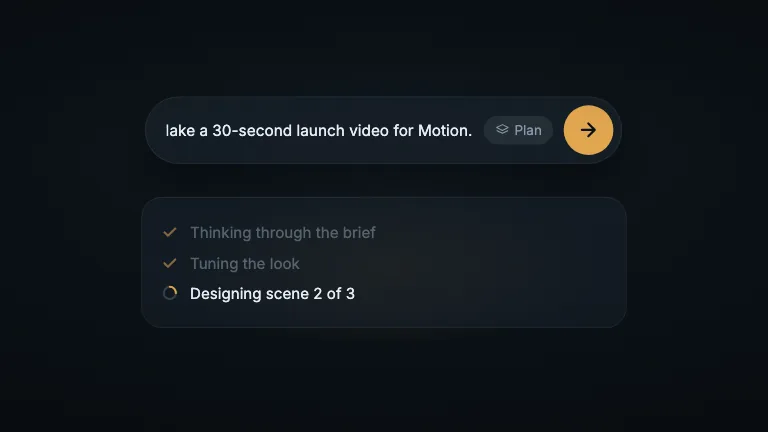
A prompt typed into a dark composer, Plan mode clicked on, and the send button growing through the frame into the next shot
This is the format it was composed for. Switch above to see it lay itself out for another: same animation, re-arranged for the frame.
What you can change · 5 settings
Everything below can be changed without touching the animation. Hand the list to an agent, or edit the values at the bottom of the component file.
- Prompt *prompt · string
The prompt that types itself into the bar. The reference is 39 characters and the typing keeps its measured rhythm at any length, so a longer prompt types faster. Past about 45 characters the end of it runs under the chip.
now: Make a launch video for our new product
- Mode *mode · string
Label on the mode chip before it is clicked. One short word reads closest to the reference.
now: Plan
- Mode on *modeOn · string
Label on the chip once it is clicked on. The chip is anchored at its right edge and widens leftwards to fit it.
now: Plan on
- Pointer *pointer · boolean
Draw the mouse pointer. It is in the reference and it is what makes the two state changes read as clicks.
now: true
- Brand *brand · string
Brand token id. The chip lights and the button fills with the accent, and the arrow is drawn in accentInk, so the frame ends on accentInk: a dark brand with a saturated accent is what this was measured on.
now: ember
For developers · source, dependencies and provenance
Dependencies
No Tailwind, no CSS, no asset files. Inline styles only.
Source
Provenance
Prompt
A dark composer bar in the middle of a near-black frame, with a Plan chip and an orange send button at its right end. The camera settles in while a prompt types itself behind a block caret, then drifts along the line and pushes in as the last word lands. Cut close on the chip and the button: the pointer rises onto the chip and clicks it, the chip dips and comes back orange reading "Plan on", the pointer glides to the send button and clicks, a ring breaks off, and the button grows about its centre until its arrow's shaft fills the frame.