Vertical KPI Beats
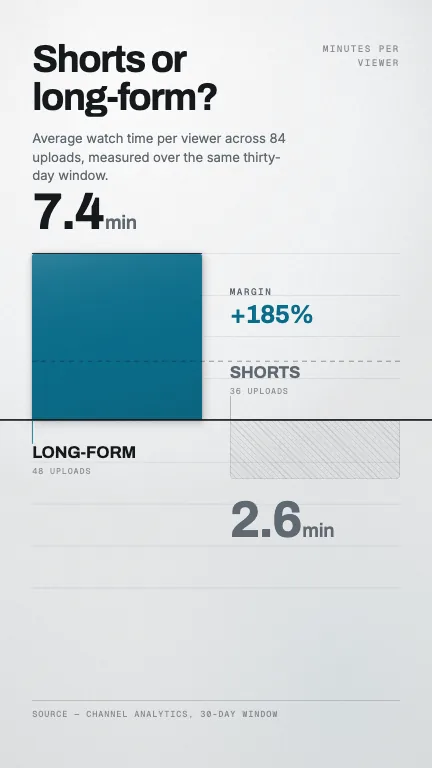
DataThree figures take the vertical frame one at a time, cut into slats that rise off a full-bleed rule and lift away for the next
This is the format it was composed for. Switch above to see it lay itself out for another: same animation, re-arranged for the frame.
What you can change · 4 settings
Everything below can be changed without touching the animation. Hand the list to an agent, or edit the values at the bottom of the component file.
- Beats *beats · array
The figures, in the order they take the frame. Three is the shape this was built for; the eight seconds are divided evenly, so four beats gives each one about a second and a half.
now: 3 items
- Titletitle · string
A quiet line at the top that stays put across all the beats, the name of the set. Omit it if the figures speak for themselves.
now: The channel, in three numbers
- Progressprogress · boolean
Show the segmented rail at the top that fills across each beat. It tells the viewer how many figures are coming, which is what stops them swiping away on the first one.
now: true
- Brandbrand · string
Brand token id, one of the keys of BRANDS. The display face travels with the palette, so this also chooses the numerals: 'circuit' is the condensed one this layout was cut for.
now: circuit
For developers · source, dependencies and provenance
Dependencies
No Tailwind, no CSS, no asset files. Inline styles only.
Source
Provenance
Prompt
Three big numbers for a vertical stats video, but one at a time rather than a grid, each figure filling the whole screen for about two seconds with its unit beside it and one line of context underneath, then the next one takes over. Set the numerals in a condensed face as large as they will go, and make the change between them feel like a shutter or a departure board rather than a fade.